How to watch digital theatre on your TV
Want to make a night of it, get comfy on the sofa, watch on a nice big screen? Read on to find out the best ways to watch our digital theatre shows on your TV.
There are several ways to achieve getting a show on the big screen, depending on what device you’re accessing the show on, and what kind of device you want to send it to. We’ll cover:
- Cables from your computer to TV
- Mirroring your device screen with Chromecast or Airplay

Theatre The Tempest
Cables from your computer to TV
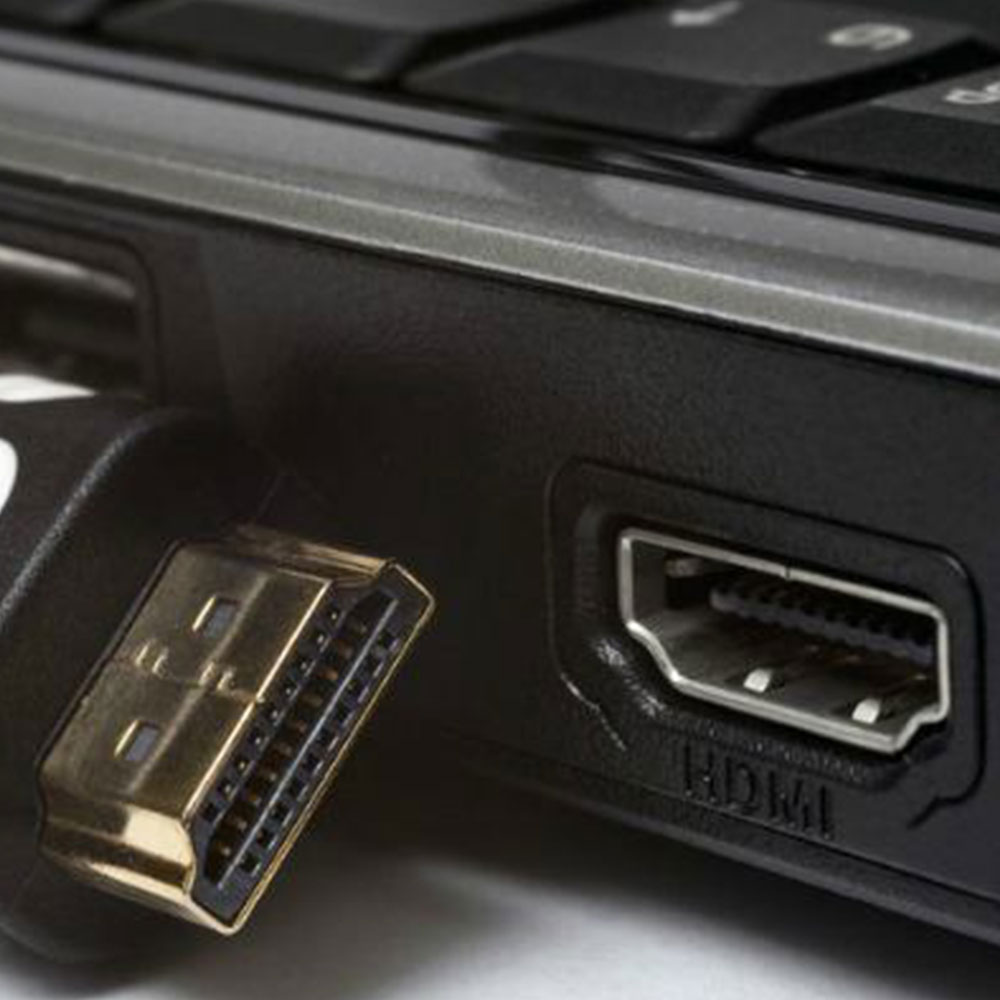
The most reliable and straightforward way to show your computer screen on your TV is to run a cable between the two. This will make a copy of your computer screen on your TV and you’ll be away. Most modern TVs have HDMI ports, for which you should find a corresponding port on your laptop (see the picture below for the shape of this). In which case, just plug in one of these and you’re good to go.
Troubleshooting
– Your laptop might copy the main screen, or it might have a second screen, which is usually just to the right of the main screen. To get the show on the main screen drag the browser that you’re using to access auditorium off the side of the screen and voila, it will appear on the second screen.
– Smaller apple laptops won’t have an HDMI port, but they will have a mini display port, thunderbolt, or USB C. There’s a page on the apple website that helps you work out what you’ve got. The it’s a case of finding an adaptor or cable from your port to HDMI. Just type in ‘[the port that you have] to HDMI’ and let Amazon do the rest.
– Some smaller laptops will also not have HDMI ports, for example Surface devices. These often have a mini display port though, in which case you need something like this.
Screen Mirroring
If you already have a Chromecast Device or Apple TV then you can mirror the screen of your computer or phone to your TV.
Chromecast is a google product that you plug in to your TV’s HDMI port. Then you can select the tab on google chrome that you want to share with the tv and send it over. Google’s support article is comprehensive.
If you have an Apple TV and and Apple device you can mirror the screens – Apple tells you how here.
You can use any video playing in a browser to test your new cables/setup. Try the trailer for our 2020 Digital Theatre production of The Wonderful Wizard of Oz.
Our Box Office team are happy to help you get everything working, just email us on boxoffice@creationtheatre.co.uk or call 01865 766266.